Spree Coming soon to Google Play

Android app

Know what you own, room by room.

Spree is a private catalogue of the things in your flat or house: what each one is, where it lives, what you paid, its serial number and receipt, and which dates are coming up.

Coming soon to Google Play

Version 1.0.0 for Android is finished and not yet published.

  • Free, every feature included
  • No account
  • Stored on your phone only

Real screens of the app, with sample data

Home

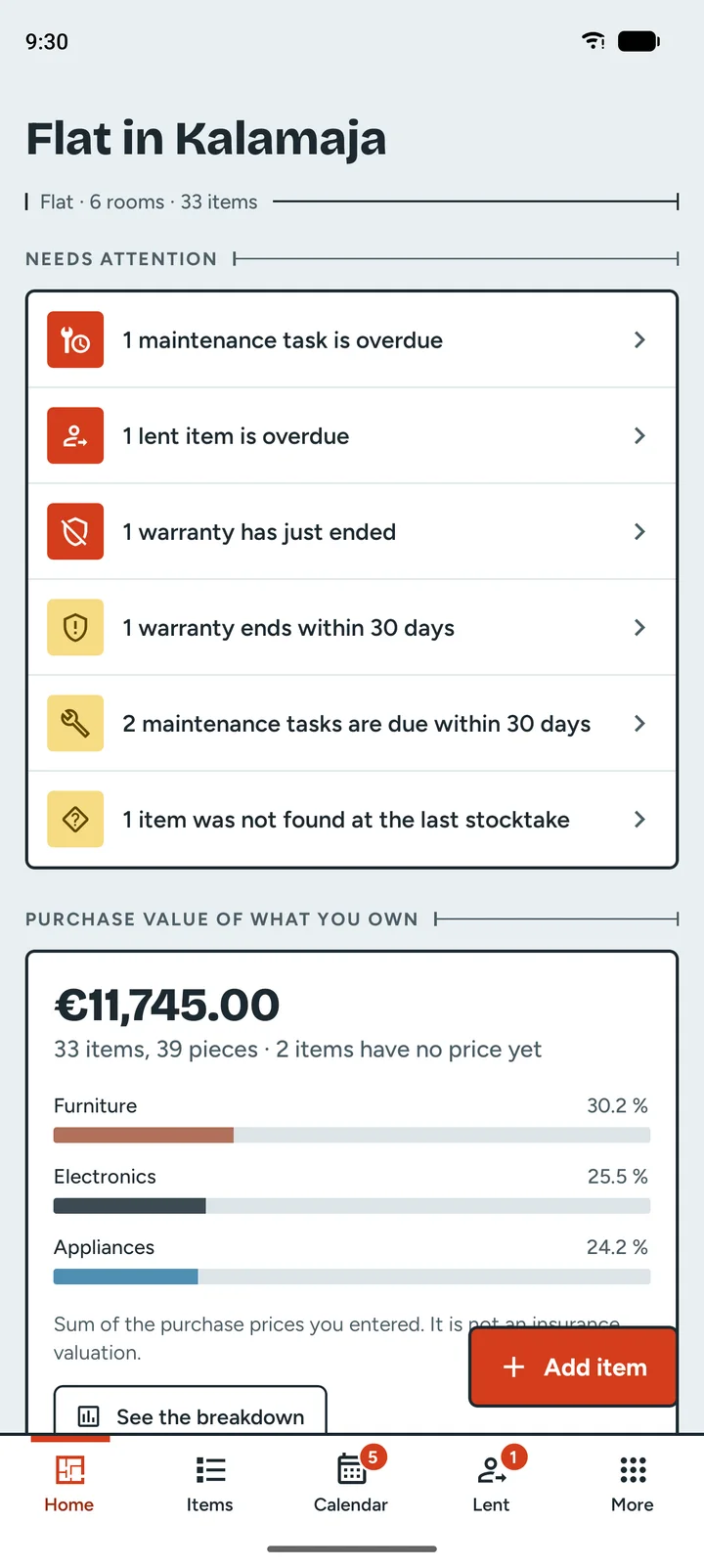
Home screen of a flat with 6 rooms and 33 items: a list of six things needing attention and the purchase value of what is owned, €11,745.00, split by category.

Items

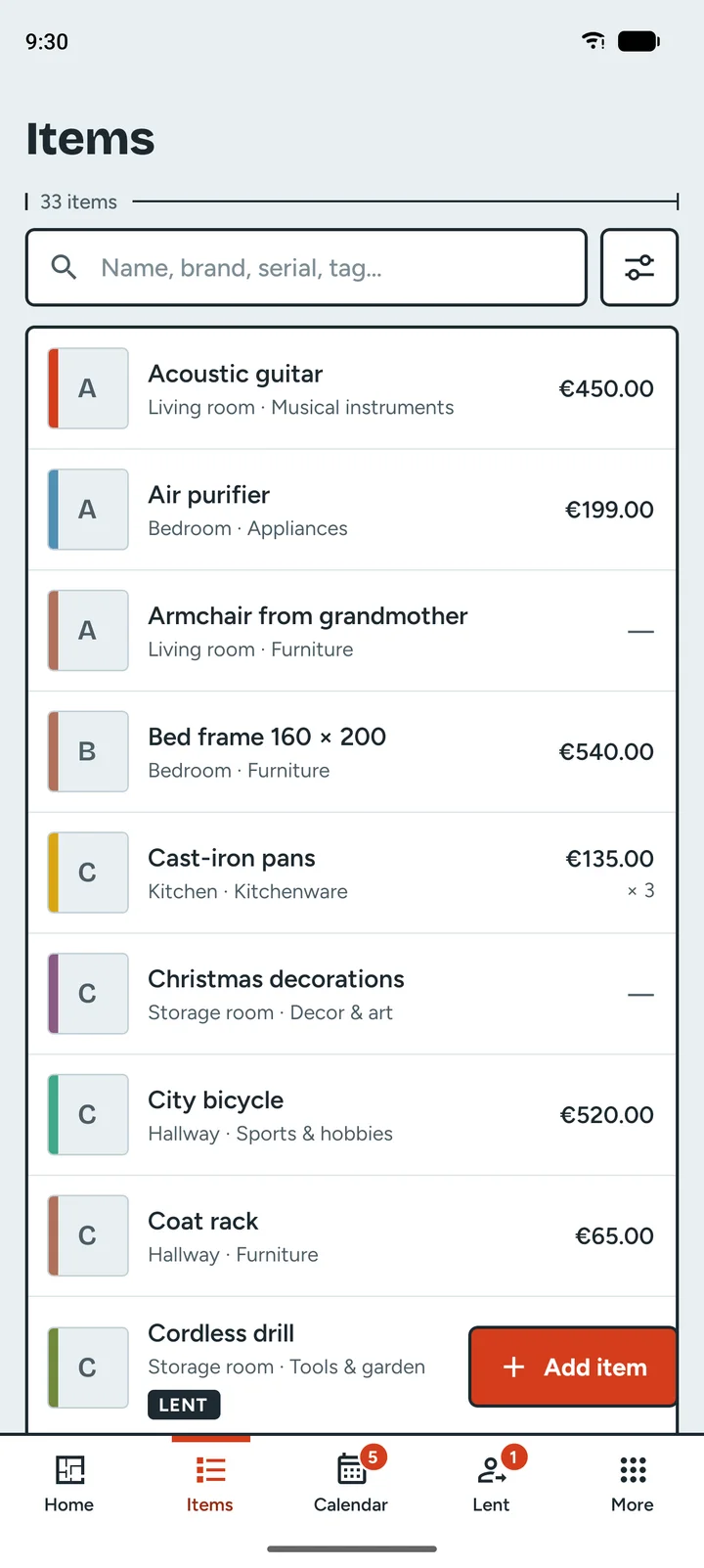
Items screen with a search box and a list of 33 items, each with its room, category and purchase price.

Insights

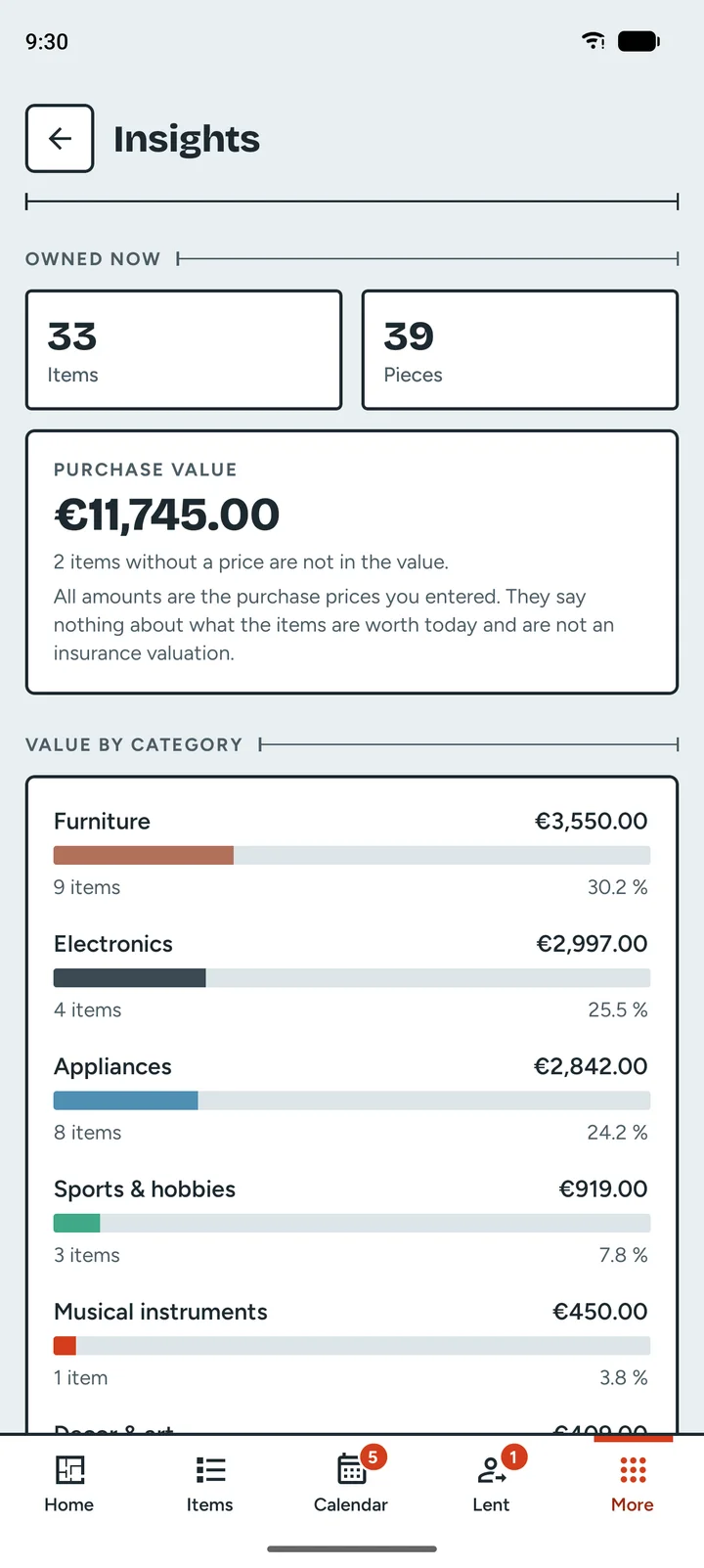
Insights screen: 33 items, 39 pieces, purchase value €11,745.00 and value by category as bars.

What is in the app

01 / 06Item

Price, serial number, receipt.

A name is enough to start. Add the rest when you have it: room, category, condition, quantity, price paid, purchase date and shop, brand, model, serial number, your own tags and notes.

  1. Photos, receipts, warranty documents and manuals are attached to the item. You pick each one in the Android picker.
  2. The price is the one you paid and typed in.
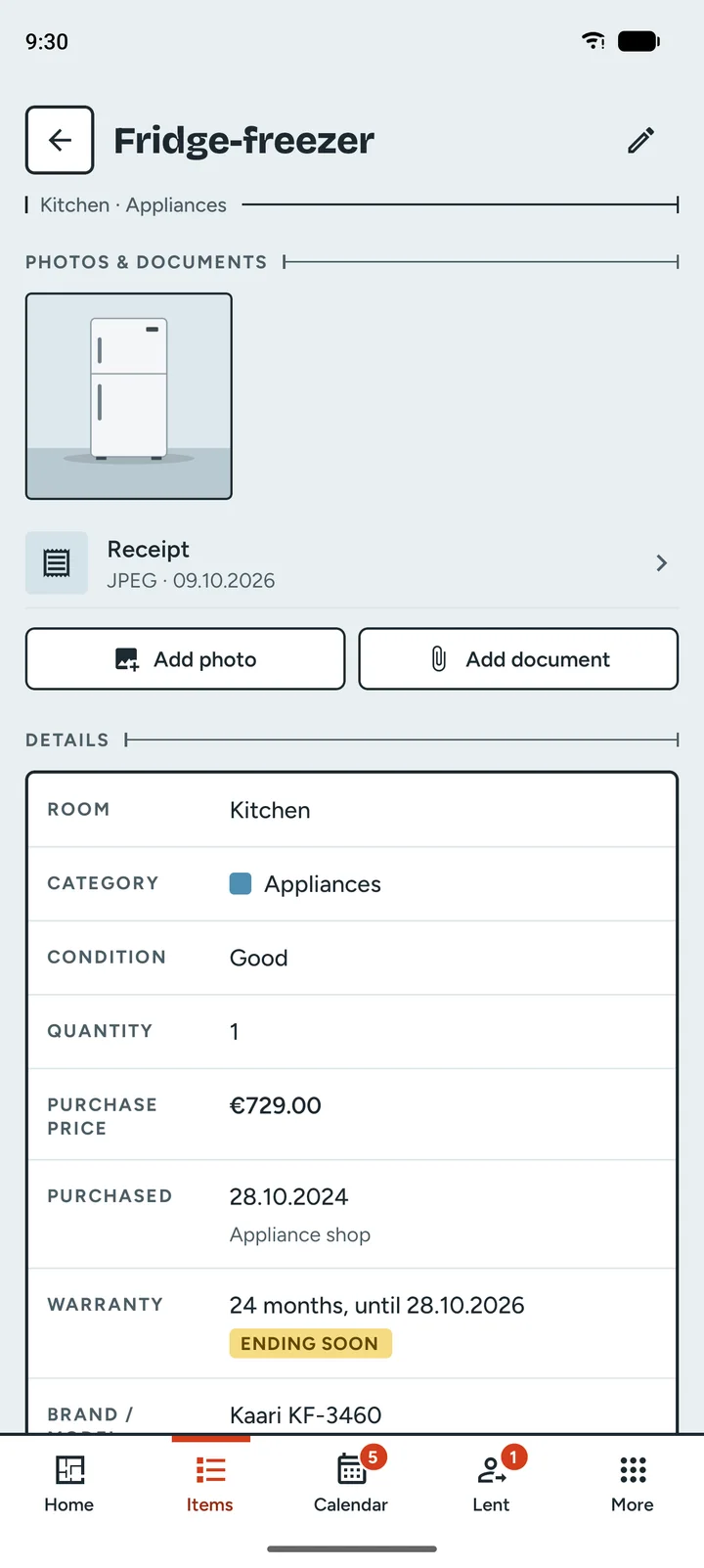
Item screen for a fridge-freezer in the kitchen: a photo, an attached receipt, and details such as category, condition, quantity and a purchase price of €729.00 and a 24-month warranty until 28.10.2026.

02 / 06Calendar

Warranty ends, without the surprise.

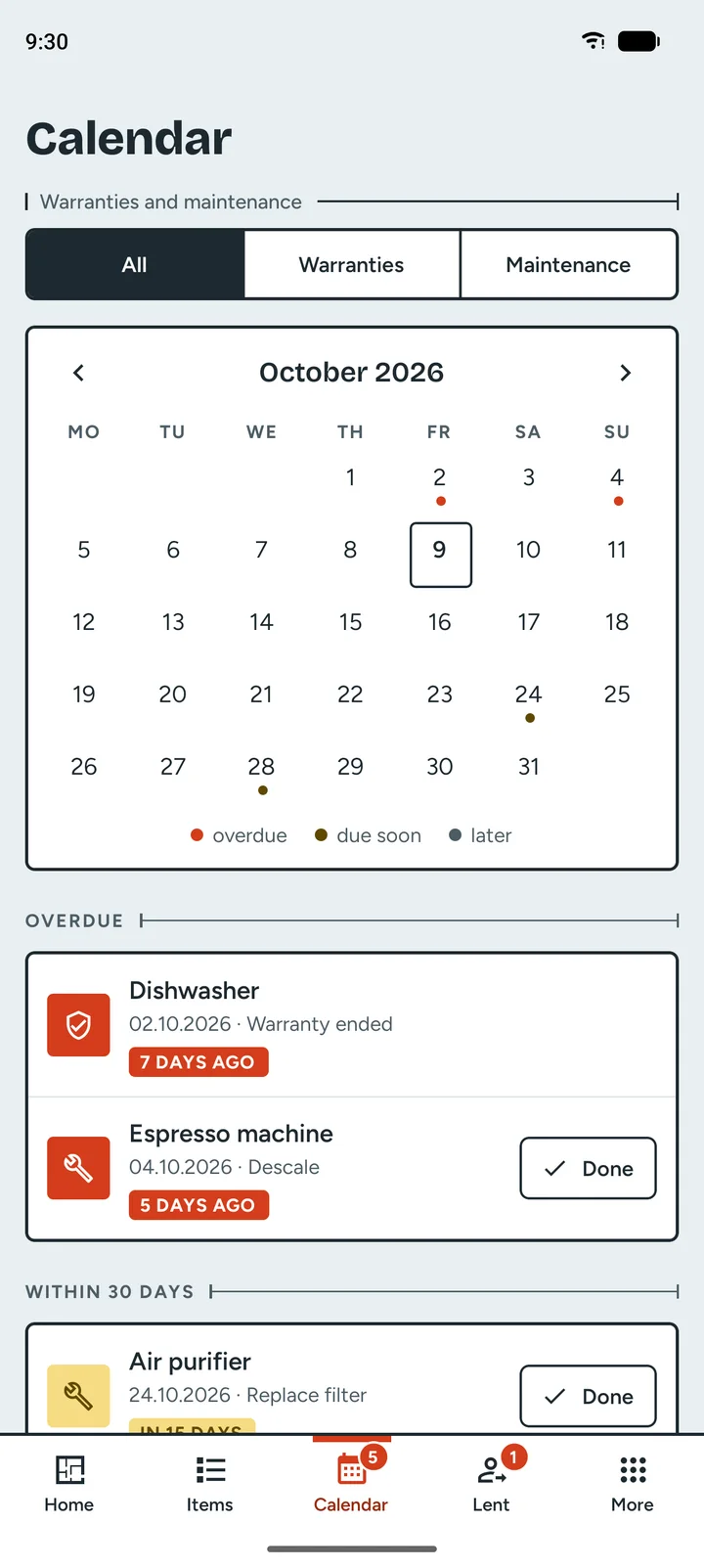
Enter the warranty length and the app works out the last day. Plan maintenance once or on a repeat: descale, replace a filter, service the bicycle.

  1. Dots mark the days: overdue, due soon and later.
  2. “Done” closes a maintenance task. A repeating one is scheduled again from the day the work was done.

The app sends no notifications. Due and overdue dates are shown inside it: on the attention list on Home, in the Calendar and as a number on the Calendar tab.

Calendar for October 2026 with marked days, and an overdue list: a dishwasher warranty that ended on 02.10.2026 and an espresso machine to descale.

03 / 06Lent

Who has the drill?

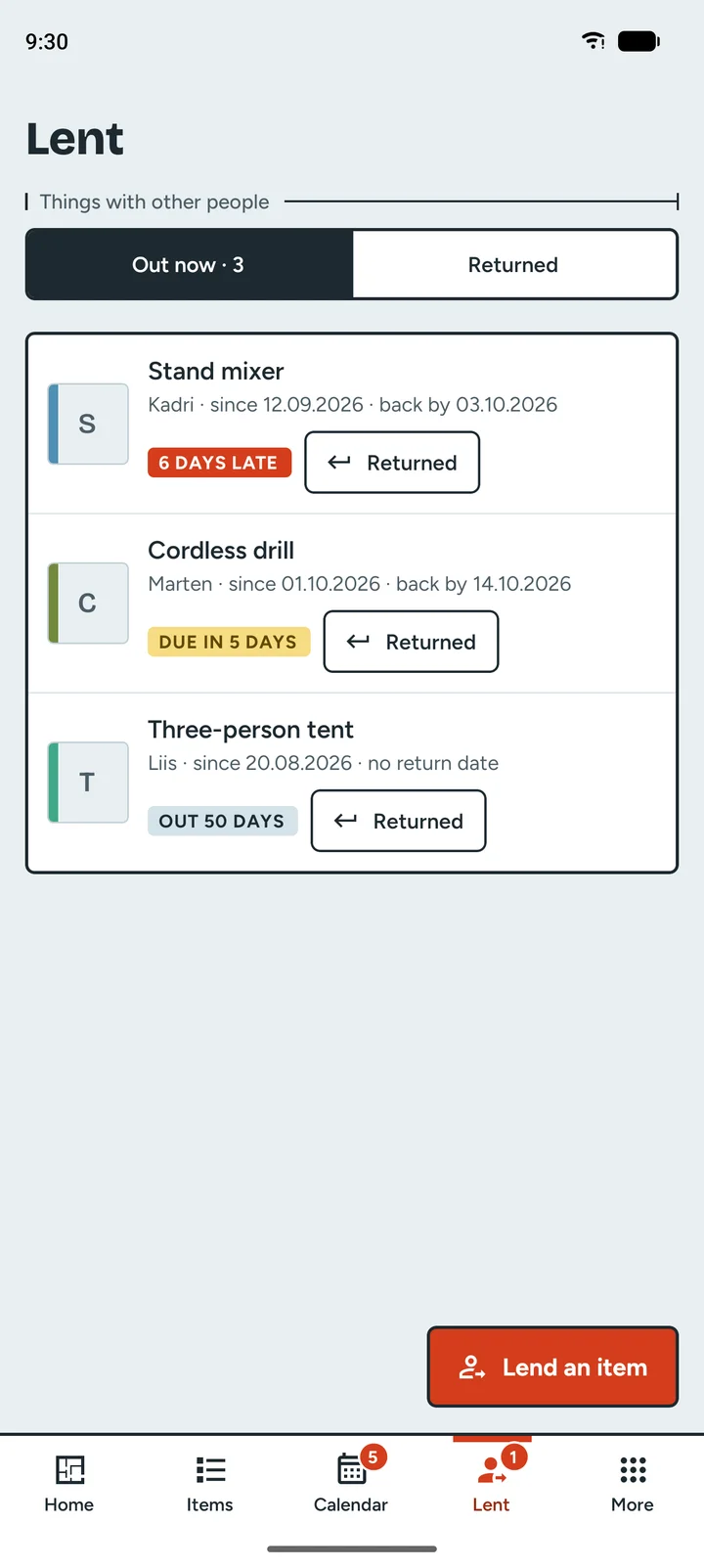
Note who borrowed something, since when and when it should be back. Names are typed by hand; the app does not read your contacts. Returned loans stay on record.

  1. Past the agreed day: marked late.
  2. Due back within a week.
  3. No return date agreed: the app counts the days out.
Lent screen with three loans: a stand mixer 6 days late, a cordless drill due in 5 days and a three-person tent out for 50 days.

04 / 06Stocktake

Walk round. Tick off.

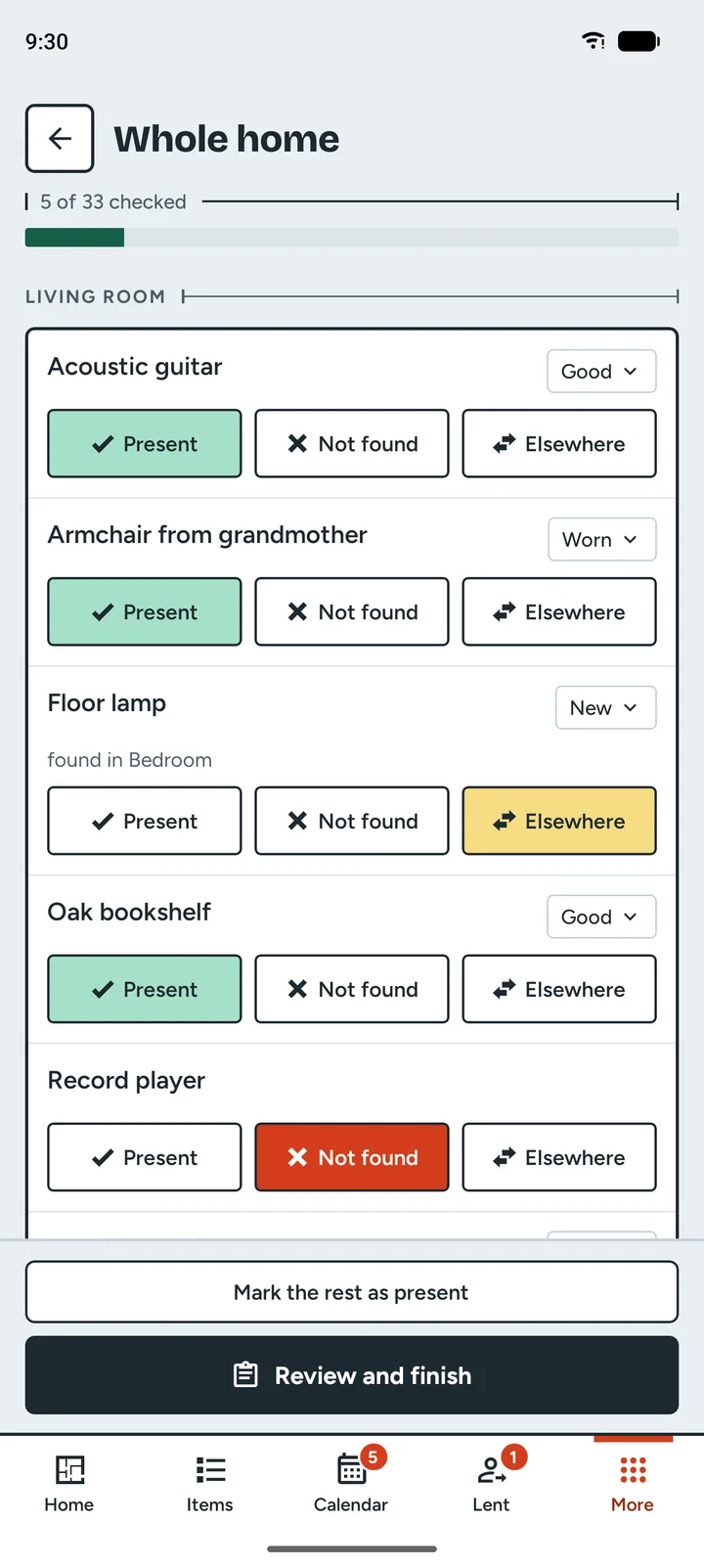
Count the whole home or one room. Nothing in the catalogue changes until you finish; then moved items get their new room, noted conditions are saved and missing items are flagged. The result is kept.

  1. Three marks per item: present, not found, or found in another room.
  2. Found elsewhere: choose the room it was in.
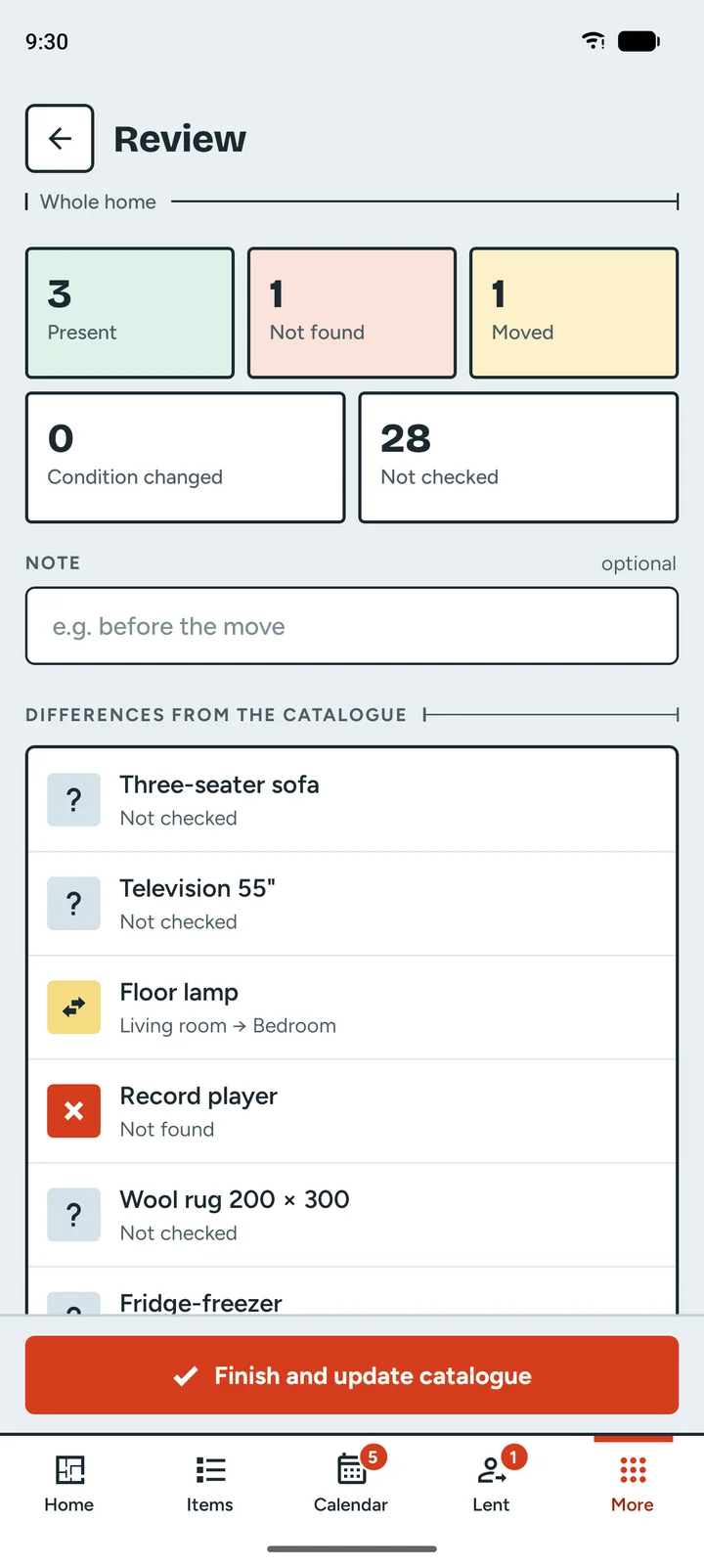
  3. The review counts what was present, not found, moved and not checked.
  4. Every difference from the catalogue is listed before you confirm.
Stocktake of the whole home, 5 of 33 checked: living-room items marked present, not found or found elsewhere.
Stocktake review: 3 present, 1 not found, 1 moved, 0 condition changed, 28 not checked, followed by the list of differences.

05 / 06Lists

A list for the move, ticked as you pack.

Gather items on a list for a move, a renovation or your insurance paperwork and tick them off as you pack, clear out or document them.

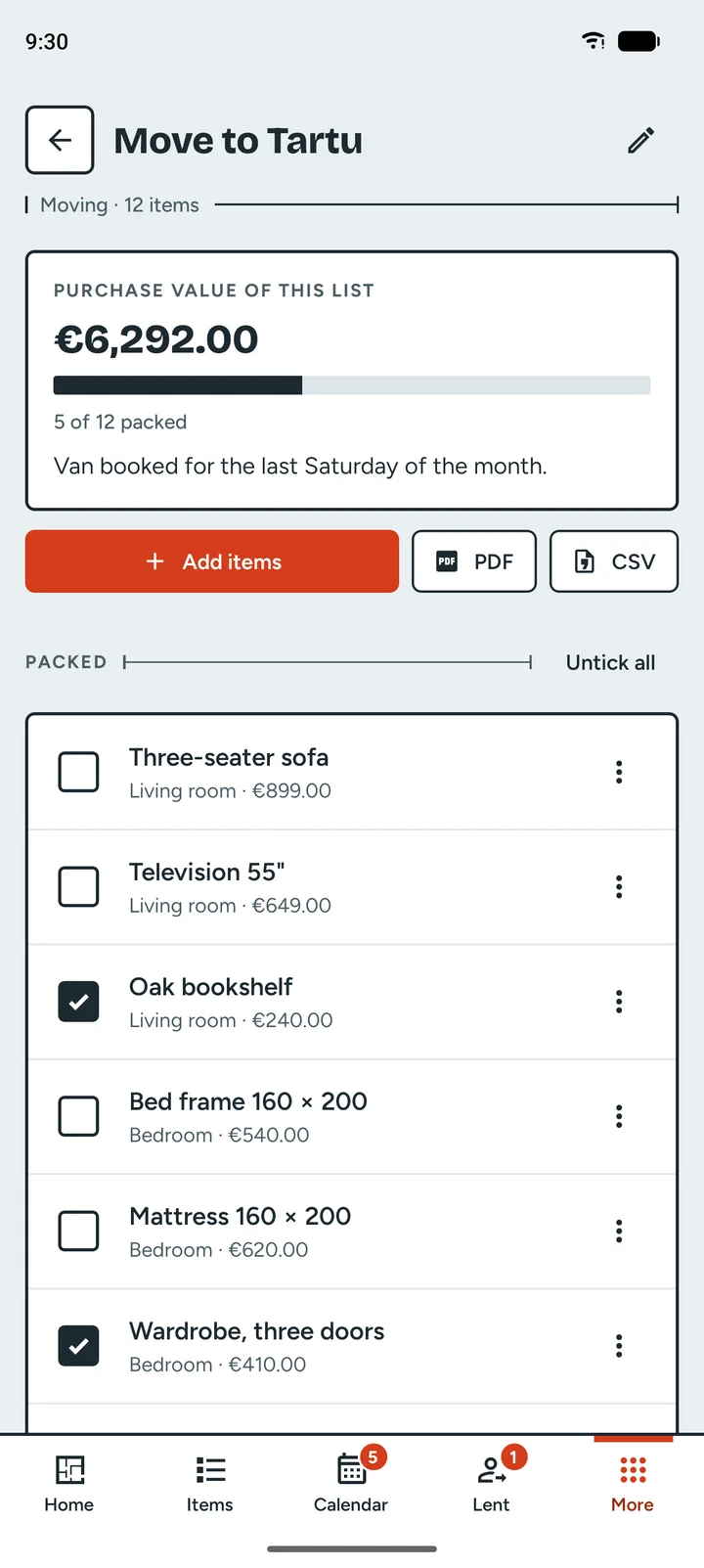
  1. The list shows the purchase value of its items and how far you are.
  2. Each list can be exported on its own, as a PDF or a CSV file.
List “Move to Tartu” with 12 items, a purchase value of €6,292.00 and 5 of 12 packed; items with tick boxes below.

06 / 06Export

Your figures, your files.

The whole catalogue as a PDF document or as a CSV file for a spreadsheet, and a backup file to move the catalogue to another phone. Share a file or save it to a folder you choose.

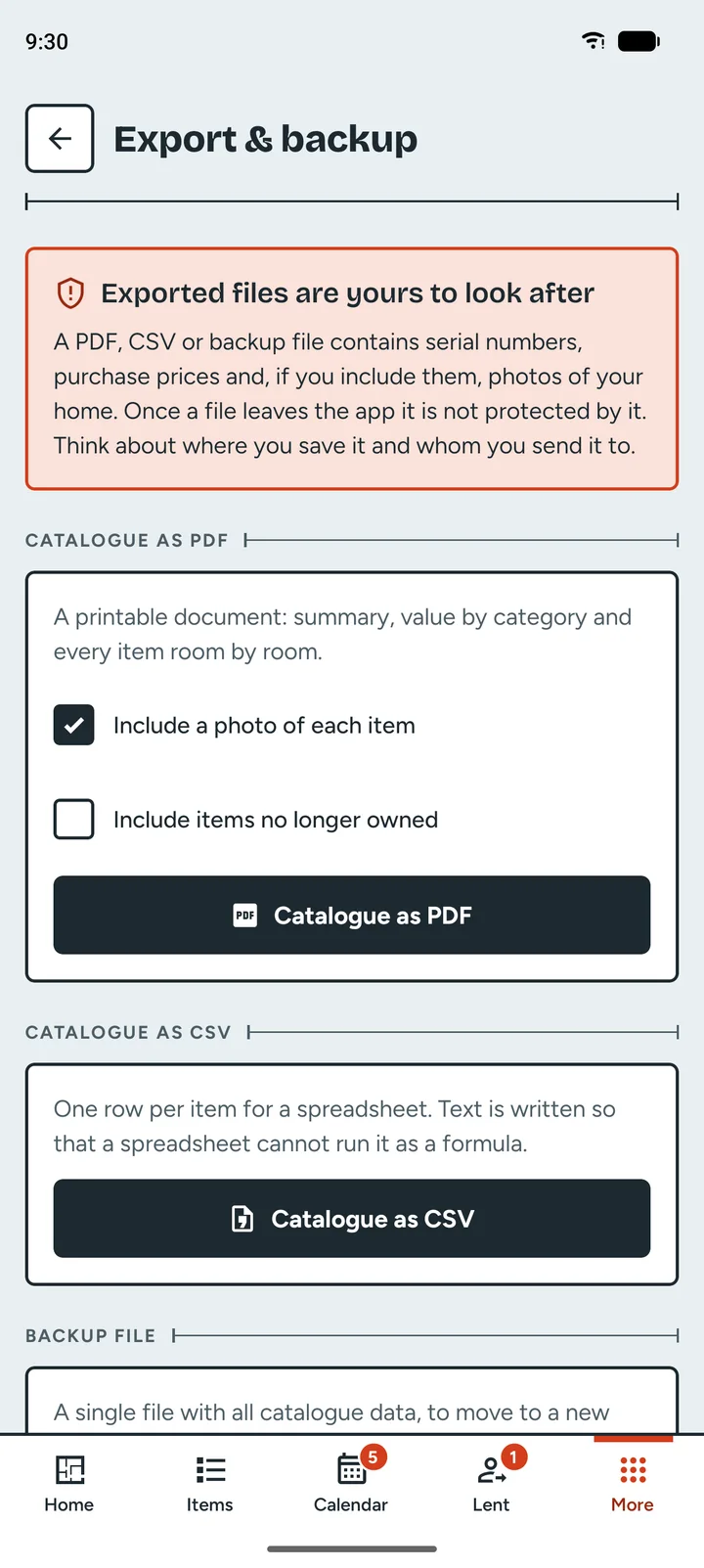
  1. The app says it before you export: the files are yours to look after.
  2. Photos in the PDF are optional.
Export & backup screen with the warning “Exported files are yours to look after” and the options for the catalogue as PDF and as CSV.

Private by design

The catalogue stays on your phone.

A list of your belongings with serial numbers, receipts, prices and photos of your rooms is sensitive. The app is built so that it stays with you.

Read the privacy policy
  • No account, no cloud

    Everything is kept in the app’s private storage on the phone. There is no server copy and nothing is synchronised.

  • No internet permission

    The app cannot send data anywhere, and the developer has no access to anyone’s catalogue.

  • No permissions asked

    You pick each photo or file yourself in the Android picker. Pictures are re-saved without location and camera data.

  • Kept out of Android backup

    The catalogue is excluded from Android’s automatic cloud backup and from phone-to-phone transfer.

  • No adverts, no tracking

    No advertising, no analytics and no purchases. Every feature is free.

Said plainly

What the app does not do.

Better to know before you start a catalogue than after.

Reminders
No notifications are sent. Reminders are the attention list on Home, the calendar and the numbered badge on the Calendar tab. You see them when you open the app.
Totals
Value totals are the purchase prices you entered. They say nothing about what the items are worth today and are not an appraisal or an insurance valuation.
Insurance
A list or an exported PDF is your own record. Whether an insurer accepts a document is for the insurer to say; the app makes no promise about it.
Backup file
The backup file holds the catalogue data only. Photos and documents are not included; on a new phone you add them again.
Exported files
A PDF, CSV or backup file contains serial numbers, purchase prices and, if you include them, photos of your home. Once a file leaves the app it is not protected by it. Where you keep it and whom you send it to is your responsibility.
Sync and sharing
One home profile on one phone. There are no accounts, so there is no sync between phones and no shared household.

Questions

Short answers.

More answers and contact
Will the app remind me?

It sends no notifications. Dates that are due soon or overdue appear on the attention list on the Home tab, in the Calendar and as a number on the Calendar tab. In the settings you choose how far ahead “due soon” looks.

How is the end of a warranty worked out?

The purchase date plus the warranty length in calendar months. A fridge-freezer bought on 28.10.2024 with 24 months is covered until 28.10.2026. If the end month is shorter, the last day of that month is used.

Are the totals what my things are worth?

No. They are the sum of the prices you paid and typed in. The app does not estimate current value or depreciation, and the figures are not an appraisal or an insurance valuation.

How do I move to a new phone?

Create a backup file under Export & backup, copy it to the new phone and restore it there. Add photos and documents again on the new phone: they are not included in the file. Android’s own backup and phone-to-phone transfer do not carry the catalogue across.

What does a stocktake change?

Nothing until you finish it. Then items found elsewhere get their new room, the conditions you noted are saved and items you could not find are flagged “Not found”. Items you did not check stay as they were. The result stays on record.

Download

Start with one room. Add the rest later.

For Android phones, in English. Free, with every feature included: no account, no adverts, no subscriptions, no in-app purchases.

Coming soon to Google Play

Version 1.0.0 for Android is finished and not yet published.

App
Spree
Version
1.0.0
Platform
Android
Price
Free